 SMail
SMailSUPPORT
Need help with SMail?
Send us a
Support Report.
When something isn't working as expected, SMail can prepare the diagnostic information we need to investigate the problem.
In SMail, select Help → Send to Support…. SMail prepares a support email with your .smailreport attached, so you don't have to collect technical information yourself.
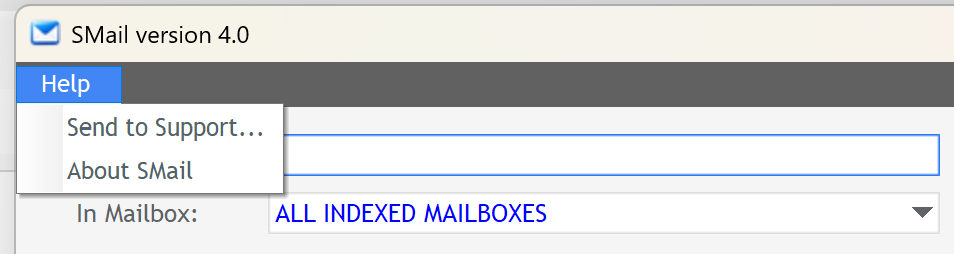
In SMail: Help → Send to Support…
YOUR SUPPORT REQUEST
SMail prepares the technical details for you.
Choose Help → Send to Support… in SMail. Your support email is prepared automatically with the .smailreport already attached.
Your License key must be included with your support request. Enter it in the prepared email. It is kept separate from the .smailreport.
Send the prepared email to support@smailsearch.com.
.smailreport attachment.The Support Report contains the diagnostic information we need to investigate your SMail installation. Without it, we may not have the information needed to help you.
The .smailreport does not contain your License key or the contents of your Outlook email.
HELP US UNDERSTAND THE PROBLEM
Tell us what happened.
Your Support Report gives us the technical details. A short description from you helps us understand what you were doing when the problem occurred.
There's no need to diagnose the problem yourself.
Just describe what happened in your own words — the attached Support Report provides the technical information.
WHAT HAPPENS NEXT
You've sent the report.
We'll take it from here.
Once your support email arrives, we'll use your description together with the attached SMail Support Report to investigate the problem.
If we need anything else from you, we'll reply to the email address you used to contact Support.
.smailreport gives us the technical information collected by SMail at the time you created your support request.READY TO SEND YOUR SUPPORT REPORT?
In SMail, choose Help → Send to Support…
Email: support@smailsearch.com